Everyone in LiftSync has a role in each organisation they belong to. Your role decides what you can change. Everyone can see the lifts, alerts and history for the organisations they belong to.
The roles
Owner. Runs the organisation's account in LiftSync. Owners can do everything: look after properties, lifts and gateways, acknowledge and resolve alerts, and decide who has access. Only owners can invite people, change someone's role, and move or archive organisations.
Admin. Sets things up and keeps them up to date. Admins can add and change organisations, properties, lifts, gateways, on-site contacts and who gets told when something goes wrong. They can't move or archive organisations, invite people or change anyone's access.
Operator. Keeps on top of alerts day to day. Operators acknowledge and resolve alerts, fit gateways to lifts (including adding a new gateway while they fit it) and can send commands to a lift's gateway. They can't change property details or settings.
Viewer. Keeps an eye on things. Viewers see the same lifts, alerts and history as everyone else, but can't change anything or acknowledge alerts.
Reseller. A lift company that looks after LiftSync for its customers. People at a lift company have a role there (owner, admin, operator or viewer), and that role applies to every customer organisation the lift company looks after. For example, an admin at the lift company can do what an admin can for each customer. Owners and admins at a lift company can also add new customers and look after the lift company's own staff, but can't give anyone a role above their own. See Manage your lift company's staff.
Who can do what
| Task | Owner | Admin | Operator | Viewer |
|---|---|---|---|---|
| See the map, properties, lifts, alerts and activity | Yes | Yes | Yes | Yes |
| Run and download reports | Yes | Yes | Yes | Yes |
| Acknowledge and resolve alerts | Yes | Yes | Yes | No |
| Send a command to a lift's gateway | Yes | Yes | Yes | No |
| Fit a gateway to a lift (Allocate lifts) | Yes | Yes | Yes | No |
| Add a new gateway while fitting it to a lift | Yes | Yes | Yes | No |
| Add a gateway to stock (Register gateway) | Yes | Yes | No | No |
| Move a gateway or return it to stock (Release to stock) | Yes | Yes | Only gateways their organisation owns | No |
| Change a gateway's details | Yes | Yes | No | No |
| Add and change properties, lifts and on-site contacts | Yes | Yes | No | No |
| Choose who gets told when something goes wrong (Escalation) | Yes | Yes | No | No |
| Add organisations and change their details | Yes | Yes | No | No |
| Move or archive organisations | Yes | No | No | No |
| Invite people and change their access | Yes | No | No | No |
People at a lift company have the column for their role there, in each customer organisation.
Access carries down to child organisations
Organisations can sit under one another. For example, a property group might have one organisation for each city, and one for each building inside a city.
Your role in an organisation also applies to every organisation underneath it. If you're an owner of the property group, you're an owner of each city and each building under it too, without being added to each one.
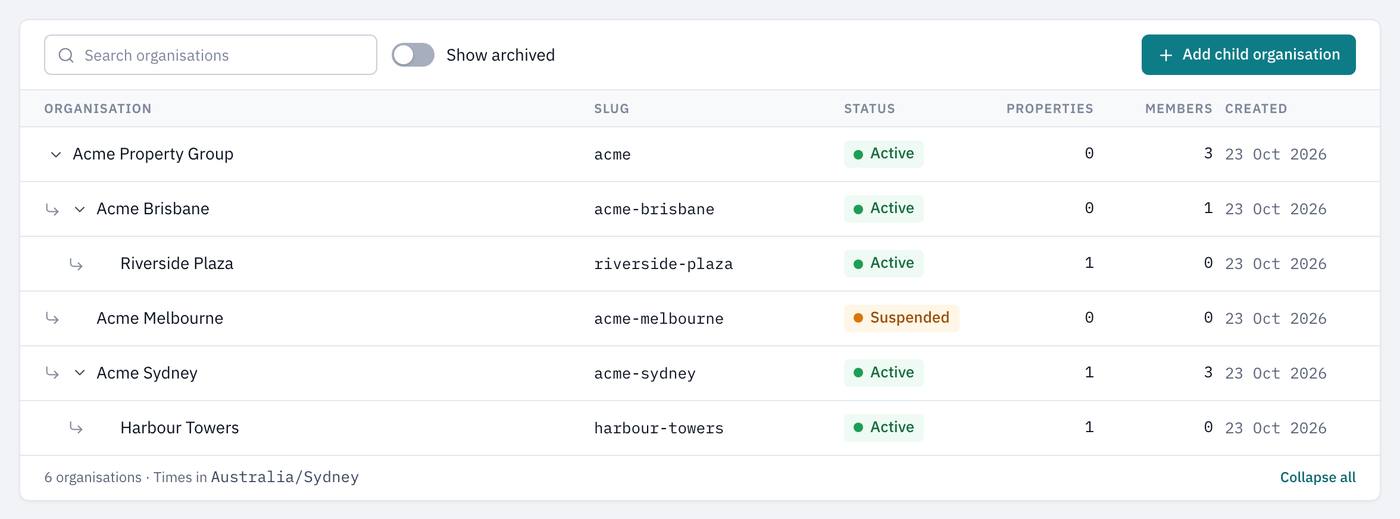
An owner of Acme Property Group sees and manages every organisation under it.
It doesn't work upwards. Someone who belongs only to a building's organisation sees that building, not the rest of the property group.
Different roles in different organisations
You can belong to more than one organisation, with a different role in each. For example, you might be an admin of one organisation and a viewer of another. Pages show the controls that match your role for whatever you're looking at, so you see edit buttons on one organisation's properties and not on another's.
To see which organisations you belong to and your role in each, ask an owner, or see Invite people and manage their access.