Two reports help you find emergency call equipment that needs looking at, across a whole organisation at once:
- Device status lists gateways that have stopped reporting to LiftSync.
- Battery levels shows the backup battery in every gateway, starting with the ones that need replacing.
A gateway is the device in a lift that connects the emergency call button to the call centre. Both reports include every gateway that is fitted to a lift. They leave out gateways that are in stock, or that are at a property but not yet fitted to a lift, because LiftSync doesn't expect to hear from those yet.
To open the reports and choose the organisation, see Run a report and download it.
Device status
Device status lists gateways that LiftSync hasn't heard from. If a gateway stops reporting, the emergency phone in that lift may not work, so these are worth checking first.
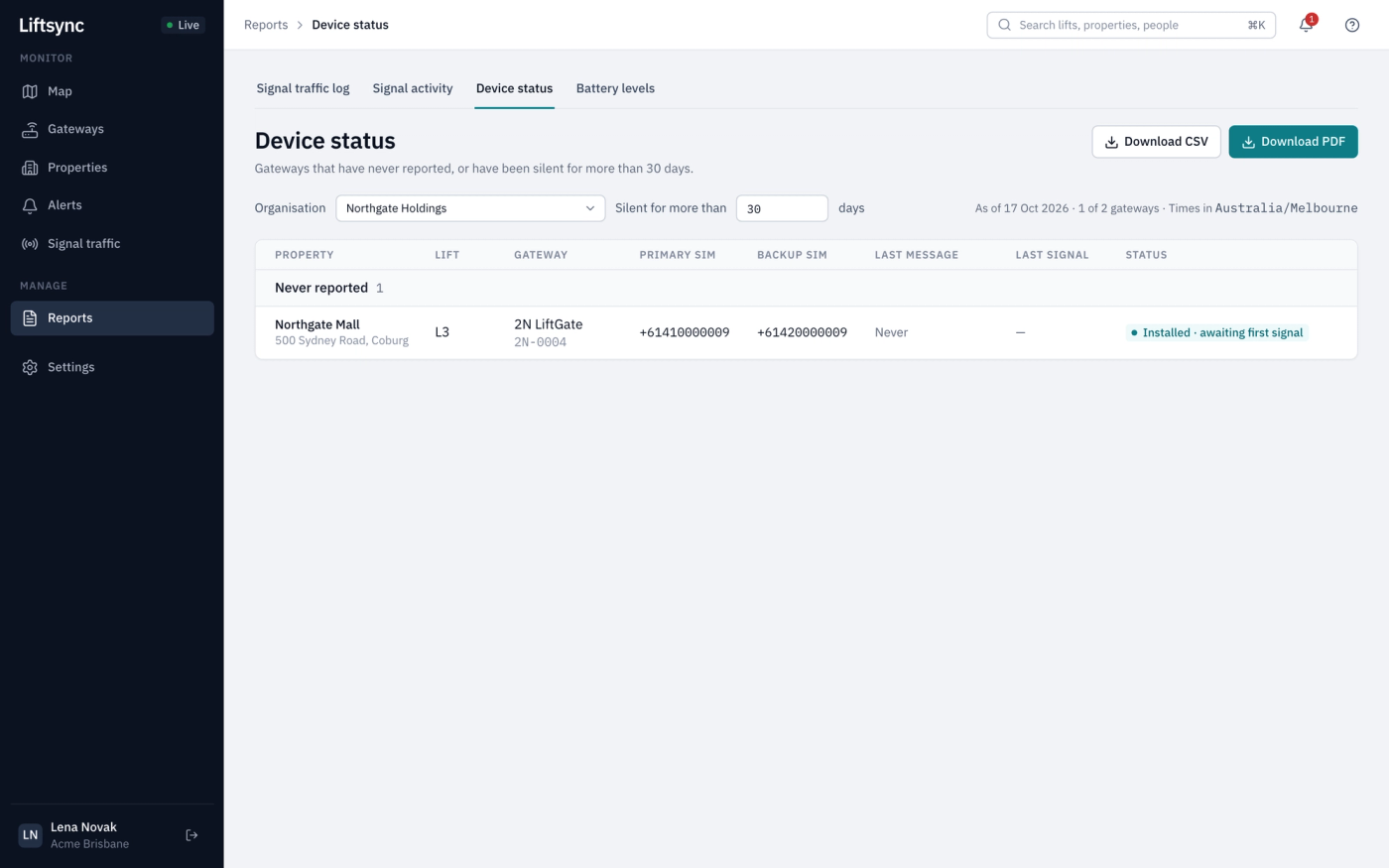
The gateways are in two groups:
- Never reported: the gateway is fitted to a lift but hasn't sent anything yet. This is expected straight after a new gateway is fitted. If it goes on, the gateway may not be set up or connected properly.
- Silent for more than 30 days: LiftSync has heard from the gateway before, but not recently. The gateways that have been quiet the longest are at the top.
For each gateway you see its property, lift, model, the phone numbers of its SIM cards, when its last message arrived and what it was. Status is the same as on the Gateways page. A gateway marked Reporting disabled has been told to stop reporting on purpose.
Change how long counts as silent
The report starts with gateways that have been quiet for more than 30 days. To change this:
- Enter a number of days, from 1 to 365, in the Silent for more than box.
- Press Enter, or select somewhere else on the page. The report updates.

A short time, such as 2 days, finds gateways that have only just gone quiet.
If no gateways match, the report says so, for example "No gateways have been silent for more than 30 days." That's good news: there's nothing to download.
Battery levels
Each gateway has a backup battery that keeps the emergency phone working if the mains power goes. Battery levels shows every gateway's battery as of today, with the ones that most need replacing first.
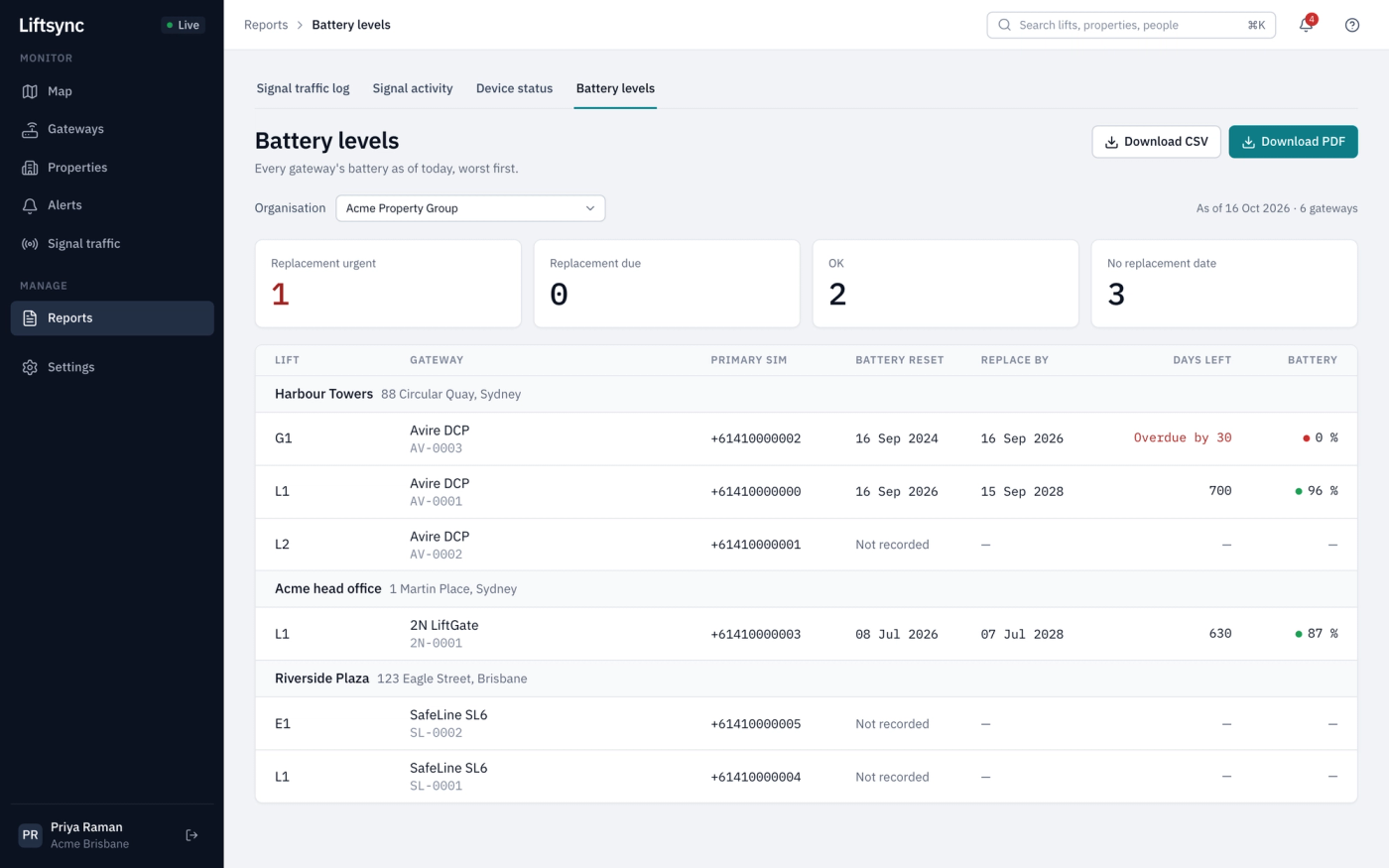
The four boxes at the top count the gateways in each state:
| Box | What it means |
|---|---|
| Replacement urgent | Replace the battery now |
| Replacement due | Replace the battery soon |
| OK | The battery has plenty of life left |
| No replacement date | LiftSync can't work out when to replace it, usually because nobody has recorded when the battery was last replaced |
Below, the gateways are grouped by property. The property with the most urgent battery comes first. For each gateway you see:
- Battery reset: when the battery was last replaced. Not recorded means nobody has entered the date.
- Replace by: the date the battery should be replaced by.
- Days left: how many days until then. Overdue by means the date has passed.
- Battery: roughly how much battery life is left, with a red, amber or green dot.
The figures are the same as on each gateway's own page. LiftSync works them out from when the battery was last replaced and how long that model's battery lasts. See Check a gateway.